Artec 3D
Artec 3D is best known for professional 3D scanners. So it may come as a surprise that the company also offers a low-cost, accessible photogrammetry solution: AI photogrammetry.
|
ADVERTISEMENT |
Available via an Artec Studio Lite subscription or the full version of Artec’s flagship software, Artec Studio Pro, this feature is a game-changer for everyone from makers to design professionals. Essentially, the technology makes it possible to capture geometry data and realistic textures that can be applied to 3D scans—or to digitize objects outright with a smartphone anytime, anywhere.
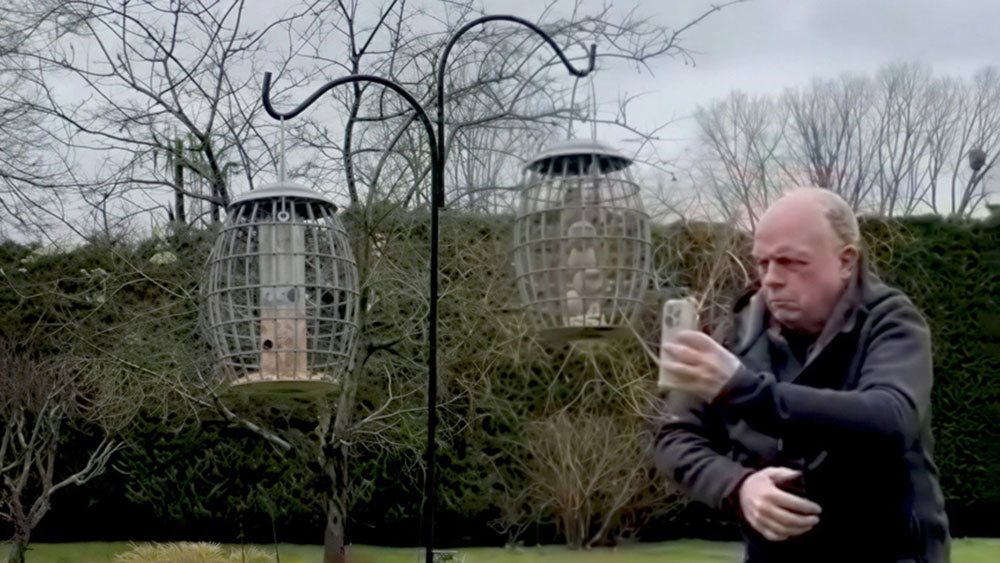
Already, AI photogrammetry has been used to digitize objects ranging from tiny bugs to whole buildings. However, to really test the technology’s capabilities, Artec’s long-standing partner Patrick Thorn has begun using it to capture increasingly tricky objects, including a bird feeder. Normally, a multilevel, reflective cage structure would be very tricky to scan.
This proved no trouble for Patrick and his iPhone. With minimal setup, it took just 60 seconds to capture a video from all angles, then generate a complete, highly detailed 3D model with Artec Studio.
Capturing everyday objects with an iPhone
Ordinarily, it would easily be possible to capture such a small intricate object with the ultrahigh-resolution Artec Spider II 3D scanner—and there are reasons that you would choose this over photogrammetry: surface adaptability, geometric accuracy, and speed of setup, to name a few.
But what if you don’t need precise dimensions, and it’s all about realism? AI photogrammetry handles tricky surfaces much better than other industry competitors. Patrick’s bird feeder is an excellent example of this because you can’t fit your device inside, so this is another layer of adaptability. The geometry is also narrow, reflective, but relatively dull, making its features difficult to track.
Yet, it took Patrick just moments to digitize. Working outside in the feeder’s natural environment offers all the benefits of surrounding features and ideal lighting. He could’ve captured photos from all angles. However, in the end all it took was one video. In a matter of seconds, Patrick went from producing an iPhone video to transferring it to his PC and acquiring a complete 3D dataset.
“Now, I can see something I like and just scan it,” says Patrick. “It’s simply a matter of taking a few pictures or using the video function. It could not be easier. AI photogrammetry is just seconds away with a phone or camera in your pocket. You can take your phone and capture data for 3D models straightaway. It’s a great way to start learning. All you need is a phone and a browser. It just works.”
Turning videos into 3D models in Artec Studio
Generating photogrammetry 3D models in Artec Studio couldn’t be easier. Patrick uploaded his video to the software, where photo data were automatically extracted and stitched together to form a unified feeder model. After this first processing stage, the software allows you to adjust the boundary box (so only essential details are included) before generating a great result.
Another major benefit of Artec Studio Lite is that it features all the editing tools included in the Pro version. In this case, Patrick found that hole-filling and bridging made it possible to fill a couple of small gaps, especially around the feeder’s handle. He also noted how useful it is to upload multiple datasets (this can help avoid the need for any hole-filling whatsoever).
The inclusion of scale bars also turns AI photogrammetry into a practical measurement solution. If you wanted to 3D-print product repairs, for instance, this tool would be perfect. Additionally, as Artec Studio progresses, so does Artec’s AI photogrammetry. Workflow automation is another great example of its scanning expertise crossing over into the phone-capture space.
“OK, Artec Studio isn’t literally going to take all your pictures, do everything for you, and churn out a finished model,” says Patrick. “But it isn’t far away; you’ve got all the tools at your disposal. You can very easily edit the results or set up a workflow to do this automatically. It’s kind of like scripting in Artec Studio Pro. For those who have struggled with modeling software until now, AI photogrammetry offers a nice, straightforward solution.”
Bringing 3D modeling to the masses
Patrick sees potential for AI photogrammetry far beyond the boundaries of novelty 3D models of small objects or people. Using his smartphone, he has already managed to digitize the exterior of a building—and with additional preparation, this approach could also be applied to forensic scene-capture or digitizing excavation sites. It’s even more scalable with the integration of drones, as Artec 3D has demonstrated by capturing landmarks in Luxembourg.
Within an engineering context, Patrick says AI photogrammetry can also be used to capture a rough outline for visualization purposes. Parts might need to be flipped and digitized in a few different orientations, but the technology has entry-level reverse-engineering applications.
“Photogrammetry has been around since the 1800s,” says Patrick. “But what Artec 3D has done is make the technology available to the masses. Now, it’s easier to use. People who want professional results can print a reference sheet that works like targets with 3D scanners. In the past, onscreen results haven’t correlated with real life. Instead of using high-end referencing equipment, it’s now possible to get precision parts. It’s easy, accurate, and simple to use.”
Discover the full potential of AI photogrammetry inside Artec Studio here. Or see how easy the technology is to use with our demo smartphone app for iPhone or Android. Simply upload images or videos to preview the incredibly realistic results for yourself.
Published May 21, 2026, by Artec 3D.

Add new comment